freezebase provides raster helpers that work the same on local files and on S3: rasterio_open() opens a raster for reading or writing, write_cog() writes an array, a VRT or an existing raster as a Cloud-Optimized GeoTIFF (COG), and rewrite_tiff() converts or copies an existing raster or VRT. Paths can be local or S3 UPaths, and on S3 the helpers use the credentials and endpoint stored on the path; rasterio_open() also reads public http:// and https:// URLs. Accessing S3 shows how to build an S3 path.
Read a raster
rasterio_open() reads a raster on S3 through the same path that s3fs uses for file operations. The Copernicus DEM GLO-30, a public collection of COGs, serves as an example:
from freezebase.raster import rasterio_open
from freezebase.s3 import make_s3_upath

tile = "Copernicus_DSM_COG_10_N46_00_E008_00_DEM"
dem_path = make_s3_upath(
    f"s3://copernicus-dem-30m/{tile}/{tile}.tif",
    anon=True,
    region="eu-central-1",
)
# s3fs
print(f"exists:    {dem_path.exists()}")
# GDAL
with rasterio_open(dem_path) as src:
    print(f"driver:    {src.driver}")
    print(f"crs:       {src.crs}")
    print(f"shape:     {src.shape}")
    print(f"bounds:    {tuple(round(value) for value in src.bounds)}")
    print(f"overviews: {src.overviews(1)}")
exists:    True
driver:    GTiff
crs:       EPSG:4326
shape:     (3600, 3600)
bounds:    (8, 46, 9, 47)
overviews: [2, 4, 8]
Path methods such as .exists(), .stat(), .iterdir() and .glob() use the same configuration as the raster read. A bucket listing can be large, so take a sample with itertools.islice() rather than wrapping it in list().
Write a COG
write_cog() writes an array as a COG to a local path or an S3 UPath. The profile supplies the data type, band count, shape, CRS, transform and nodata value, and an MGRS square provides the spatial part:
import numpy as np

from freezebase.mgrs import MGRSGeoBox
from freezebase.raster import write_cog

square = MGRSGeoBox.from_mgrs("32TMS35", resolution=10.0)
data = np.zeros(square.shape.yx, dtype=np.float32)
profile = {
    "dtype": "float32",
    "count": 1,
    "width": square.shape.x,
    "height": square.shape.y,
    "crs": square.crs,
    "transform": square.transform,
    "nodata": np.nan,
}

destination = make_s3_upath(f"s3://my-bucket/dem/{square.mgrs_code}.tif")
write_cog(data, destination, profile, band_names=["elevation"])
On S3, the write happens locally first: GDAL writes the COG to memory or a temporary file, and s3fs uploads it with the right content type. freezebase then reads back the stored size, so a refused upload, or one that was accepted but not kept, does not pass silently.
rasterio_open() in a write mode on S3 works the same way: it writes to a local copy that is uploaded when the dataset closes without an error.
write_cog() also accepts a VRT or the path of an existing raster in place of the array.
Rewrite or copy a raster
rewrite_tiff() rewrites an existing raster, for example to recompress or retile it, or to copy it between local storage and S3. The source and destination each use their own credentials, so the two can be in different stores:
from freezebase.raster import COG_PROFILE, rewrite_tiff

# Convert a local GeoTIFF to a COG on S3.
rewrite_tiff("scene.tif", destination, profile=COG_PROFILE)

# Copy between two stores with different credentials.
on_aws = make_s3_upath("s3://aws-bucket/scene.tif", profile="research")
on_ceph = make_s3_upath("s3://ceph-bucket/scene.tif", profile="ceph-research")
rewrite_tiff(on_aws, on_ceph)

# Delete the source once the rewrite succeeds.
rewrite_tiff("scene.tif", "scene.cog.tif", move=True)
If the rewrite fails, an existing file at the destination is left as it was.
Reproject onto an MGRS square
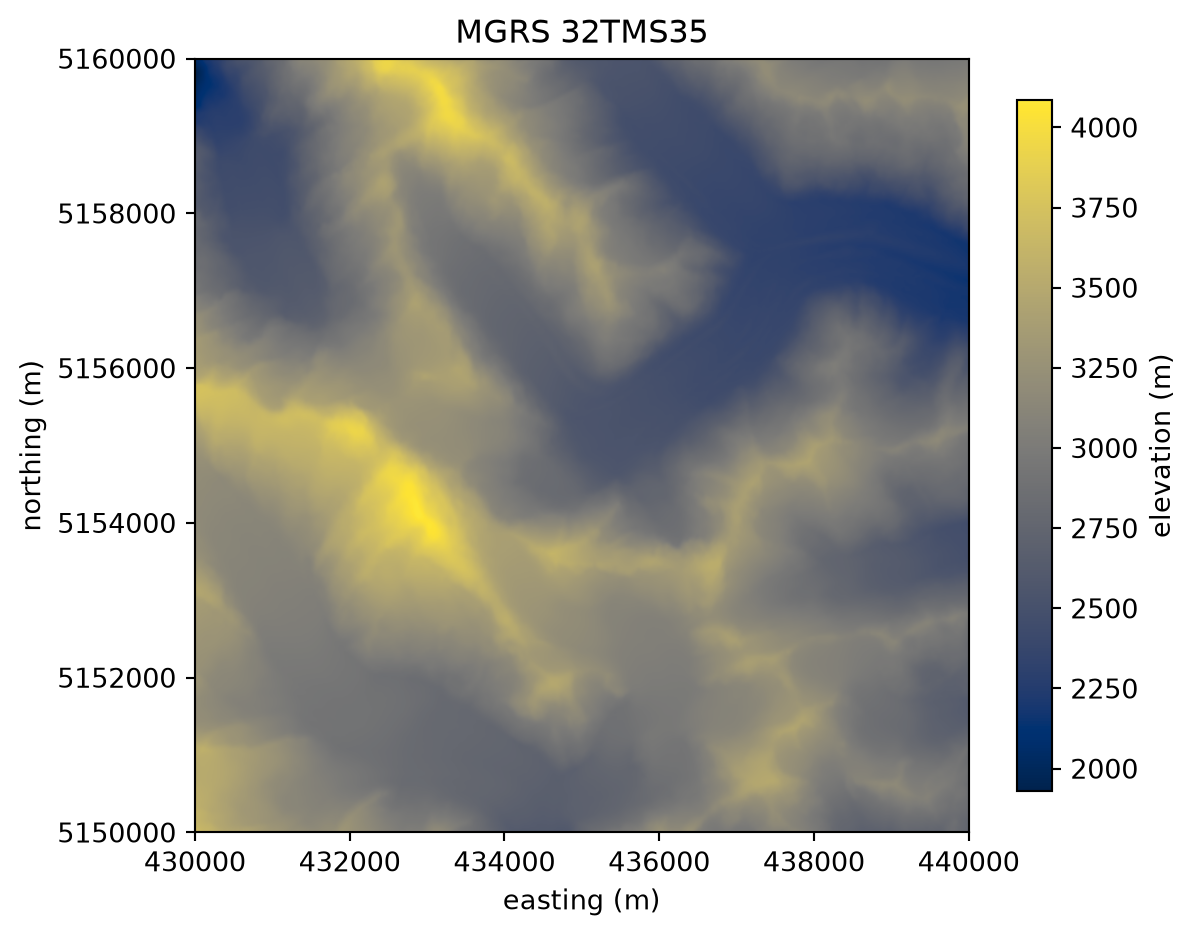
rasterio.warp.reproject moves the public DEM from geographic coordinates onto an MGRS square, with the MGRSGeoBox supplying the full destination grid:
import numpy as np
from rasterio import band
from rasterio.warp import Resampling, reproject

from freezebase.mgrs import MGRSGeoBox

square = MGRSGeoBox.from_mgrs("32TMS35", resolution=10.0)
dem = np.full(square.shape.yx, np.nan, dtype=np.float32)

with rasterio_open(dem_path) as src:
    reproject(
        source=band(src, 1),
        destination=dem,
        src_transform=src.transform,
        src_crs=src.crs,
        dst_transform=square.transform,
        dst_crs=square.crs,
        dst_nodata=np.nan,
        resampling=Resampling.cubic,
    )

print(f"{square.mgrs_code}: {dem.shape} pixels in {square.crs}")
print(f"elevation: {np.nanmin(dem):.0f} m to {np.nanmax(dem):.0f} m")
32TMS35: (1000, 1000) pixels in EPSG:32632
elevation: 1930 m to 4086 m
Passing rasterio.band(src, 1) lets GDAL read the source as needed instead of loading the whole tile into a NumPy array first. The array now has the CRS, transform and shape of square 32TMS35, like every other 10 m layer resampled onto it.
Code
import matplotlib.pyplot as plt

left, bottom, right, top = square.boundingbox
fig, ax = plt.subplots(figsize=(6.5, 5.5))
image = ax.imshow(dem, cmap="cividis", extent=(left, right, bottom, top))
fig.colorbar(image, ax=ax, label="elevation (m)", shrink=0.85)
ax.set(title=f"MGRS {square.mgrs_code}", xlabel="easting (m)", ylabel="northing (m)")
ax.ticklabel_format(style="plain")
To do the same without holding the result in memory, vrt.warp builds a VRT onto the square that write_cog() can write out; see Reproject onto a grid. For full signatures, see the API reference.